TonPlay crypto deposits
TonPlay Deposits, Networks and Crypto Transfer Checks
 Available in US
TonPlay supports more than 20 cryptocurrencies, with TON at the centre of its payment setup and several assets available across different blockchain rails. A safe deposit starts by matching the coin, network and address before the transaction leaves your wallet.
-
Crypto coverage
20+ cryptocurrencies -
Named assets
TON, BTC, ETH, USDT, USDC, BNB, LTC, TRX -
General minimum deposit
About $0.10 equivalent -
Operator deposit fee
None; network gas remains
TonPlay’s deposit menu is broad, but the transfer still begins with one asset
TonPlay lists more than 20 cryptocurrencies and names TON, BTC, ETH, USDT, USDC, BNB, LTC and TRX among the supported assets. TON is native to the product, while the wider cashier uses multiple blockchain networks.
The general TonPlay minimum deposit is listed at about $0.10 equivalent. That is a very small entry threshold in fiat terms, but it does not remove the mechanics of a blockchain transfer. The wallet may still require enough of the network’s native token to pay gas, and a token sent over the wrong rail can create a much larger problem than the amount being deposited.
The parent TonPlay payments guide maps the wider cashier. For an actual transfer, narrow the task to three checks: the asset you hold, the network selected in your wallet, and the network shown in TonPlay’s deposit dialog.
Asset
The ticker identifies what you are sending, such as TON, BTC or USDT.
Network
The rail identifies how the asset moves. USDT is the clearest example because TonPlay supports it on multiple networks.
Address
The destination belongs to the selected asset and network combination, so it should be copied only after those choices are set.
A familiar ticker can hide a different blockchain rail
TON uses its native network. TRX maps to TRON, and BNB maps to BEP20. USDT is more flexible: TonPlay supports it across several networks, including TRC20 and ERC20, and the recurring crypto boost also distinguishes USDT on TON. That makes USDT a useful reminder that the token symbol by itself is not a complete transfer instruction.
Suppose a wallet is prepared to send USDT over TRC20 while the deposit screen is showing a different USDT route. Both sides can display “USDT,” yet the rails are not interchangeable. The practical response is simple: return to the network selector and make the wallet route match the route attached to the deposit address.
Network labels also matter when a wallet groups several versions of the same token together. The receiving address belongs to a specific rail even when the balance screen makes the assets look interchangeable. If the route name is unclear, stop before sending and compare the casino selector with the wallet’s send screen. That extra check is more useful than relying on a familiar ticker or a previously used address.
- TON
- Native TON route.
- USDT
- Multiple networks, including TRC20 and ERC20; the deposit boost also identifies USDT on TON.
- TRX
- TRON network.
- BNB
- BEP20 network.
The named assets split into explicit and cashier-selected routes
Some network mappings are explicit, while others depend on the route shown in the payment dialog. The general minimum deposit applies as an approximate equivalent rather than a separate coin-by-coin threshold in the material describing TonPlay.
| Asset | Network detail | General min deposit | Operator fee | Recurring boost treatment |
|---|---|---|---|---|
| TON | TON native | ≈ $0.10 equivalent | None; network gas remains | 7% boost, x1 wagering |
| USDT | Multiple networks, including TRC20 and ERC20; USDT-on-TON is also identified | ≈ $0.10 equivalent | None; network gas remains | 7% on TON; 5% on other supported routes, x1 wagering |
| TRX | TRON | ≈ $0.10 equivalent | None; network gas remains | 5% boost, x1 wagering |
| BNB | BEP20 | ≈ $0.10 equivalent | None; network gas remains | 5% boost, x1 wagering |
| BTC | Use the network shown in the deposit dialog | ≈ $0.10 equivalent | None; network gas remains | 5% boost, x1 wagering |
| ETH | Use the network shown in the deposit dialog | ≈ $0.10 equivalent | None; network gas remains | 5% boost, x1 wagering |
| USDC | Use the network shown in the deposit dialog | ≈ $0.10 equivalent | None; network gas remains | 5% boost, x1 wagering |
| LTC | Use the network shown in the deposit dialog | ≈ $0.10 equivalent | None; network gas remains | 5% boost, x1 wagering |
The recurring boost has a $10,000 cap. These terms are separate from the multi-stage welcome package, so a deposit can sit inside more than one promotional context. Before committing funds, use the current terms attached to the specific offer you are using rather than treating all bonuses as one combined rule set.
A careful deposit sequence prevents most avoidable transfer errors
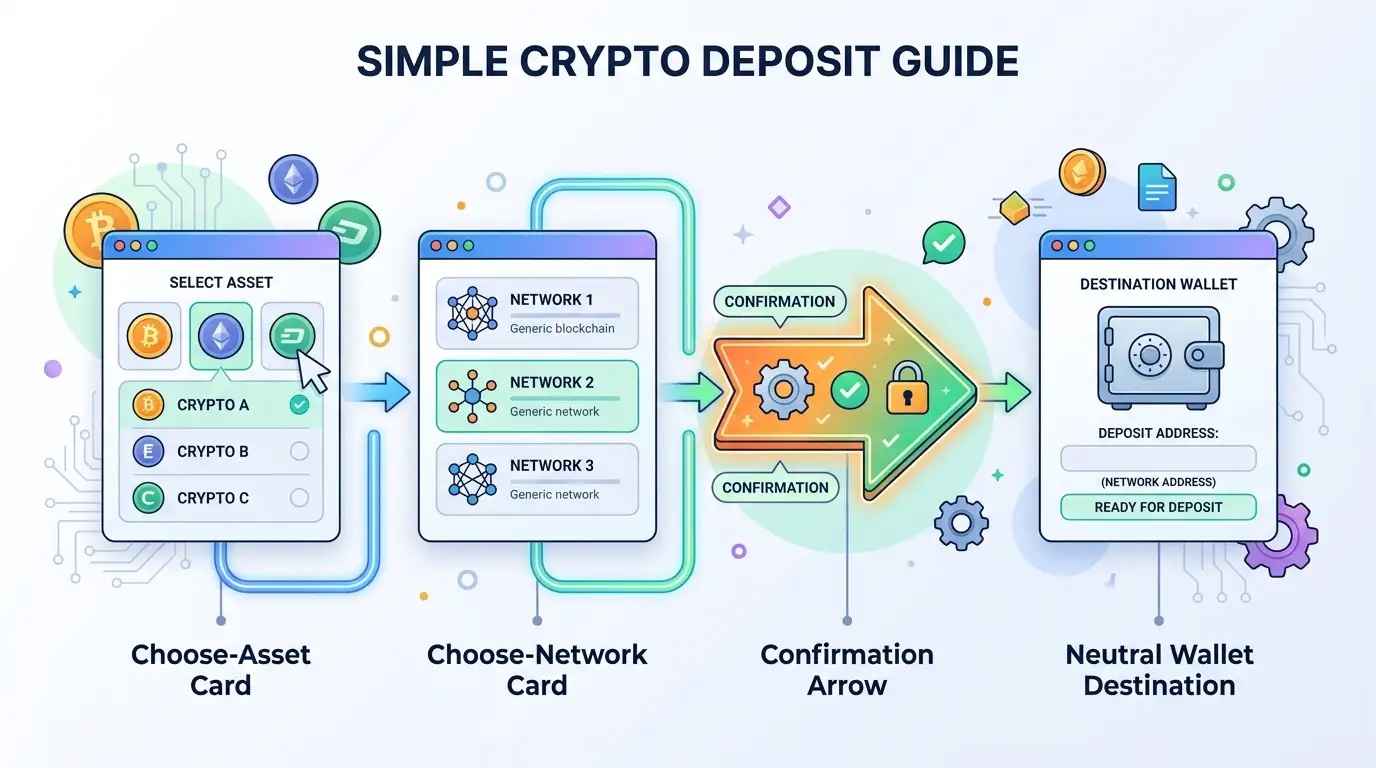
Crypto deposits do not need to be complicated, but the order of operations matters. Confirming the route before copying the address reduces the chance of a network mismatch.
- Choose the cryptocurrency in TonPlay’s deposit area.
- Read the network attached to that deposit route. If several networks are offered, select the one you intend to use.
- Open your wallet and make its network selection match the TonPlay route.
- Copy the deposit address only after the asset and network are aligned.
- Check the address again before sending. Crypto transactions cannot normally be reversed after confirmation.
- Keep enough network currency in the sending wallet to cover blockchain gas where required.
If the deposit is connected to a recurring boost or another bonus, read the active terms before the transaction. The separate TonPlay bonus guide explains how the recurring offers differ from the welcome structure.
The recurring crypto boost gives TON routes the higher percentage
TonPlay’s recurring crypto boost adds 7% for TON and USDT on TON, while other supported coins receive 5%. The offer uses x1 wagering and carries a $10,000 cap. TonPlay also promotes the crypto bonus as reaching up to 7%.
The percentage changes the credited promotional amount, not the underlying blockchain mechanics. A 7% boost does not make a mismatched network safe, and a 5% route can still be the correct choice if that is the network your wallet and deposit address are using.
Before using the boost
- Confirm whether the deposit is TON, USDT-on-TON or another supported coin.
- Read the x1 wagering condition in the active offer.
- Keep the $10,000 cap separate from the size of the blockchain transfer itself.
Keep the payment layer separate
- The boost percentage does not determine network gas.
- The offer does not replace the need to match the deposit network.
- Welcome-package terms are a separate set of conditions.
No operator deposit fee still leaves blockchain gas in the transaction
TonPlay does not add an operator fee to deposits. The blockchain can still charge gas, which is paid at the network layer rather than to the casino. That distinction is easiest to see when one token can travel on different rails: the casino fee policy can stay unchanged while the cost of the transfer changes with the chosen network and current blockchain conditions.
Gas is also separate from the deposit amount. If a wallet requires a native network token to broadcast a transaction, the wallet needs enough of that token in addition to the asset being transferred. The exact gas amount is a network condition, not a fixed TonPlay charge.
A useful way to read the final wallet screen is to separate three numbers: the amount being sent, the network fee, and the amount expected to arrive. Only the first is the deposit principal. The second belongs to the blockchain, while the third reflects the transfer after network costs. Keeping those roles separate prevents a network fee from being mistaken for a casino surcharge.
After funds reach the casino, later cashout steps introduce a different set of checks. The TonPlay withdrawal guide separates blockchain confirmation, casino processing and account verification so the stages are easier to understand.
TonPlay deposit questions
What is the minimum TonPlay deposit?
TonPlay deposits are listed with a general minimum of about $0.10 equivalent.
Does TonPlay charge a deposit fee?
TonPlay does not add an operator deposit fee. Blockchain gas can still apply to the transfer.
Which networks are explicit for TonPlay deposits?
TON uses its native network, TRX maps to TRON, BNB maps to BEP20, and USDT is supported on multiple networks including TRC20 and ERC20. The recurring boost also identifies USDT on TON.
How does the TonPlay recurring crypto boost work?
It adds 7% for TON and USDT on TON and 5% for other supported coins, with x1 wagering and a $10,000 cap.
A correct network matters more than a fast click on TonPlay deposits
TonPlay’s low general deposit threshold, broad crypto list and TON-focused recurring boost make the cashier flexible, but flexibility adds network choices. Match the asset and rail first, treat blockchain gas separately from TonPlay’s operator-fee policy, and read the active bonus terms only after the transfer route is clear.